Always-ready capture
Your moments are already being captured while you create, so your "unrecorded" highlights can still be recovered.
A new lazy way to work. Intuitive and instant workflow.
Bring back what just happened. Instantly.
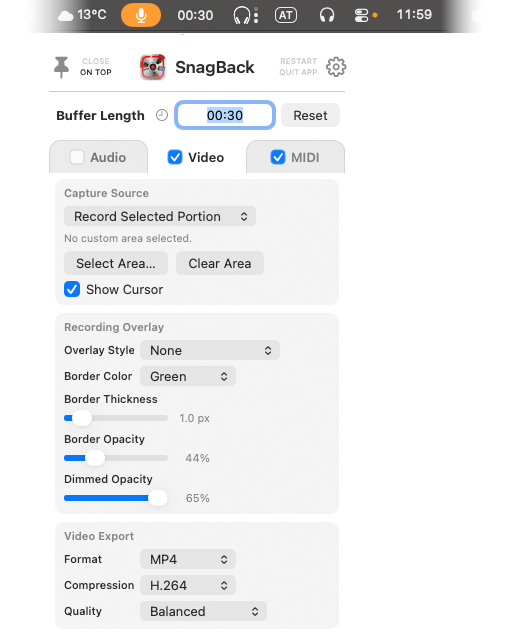
SnagBack continuously captures Screen/Video, Audio, and MIDI in the background. If something great happened before you hit Record (a clutch play, a perfect take, a funny moment, a bug worth documenting), just bring it back. Think of it like a rolling time loop: once your selected buffer length is reached, older material is overwritten automatically, so your drive stays clean while your best moments stay recoverable.
Start with a fully functional 14-day demo, then upgrade later.
See the low-effort workflow in action: capture in the background, recover the moment, and export it instantly from the menubar.
Official SnagBack Demo Video
More is coming soon.
Must-have tool for Twitch streamers and creators. SnagBack stays out of your way in the menubar, keeps a rolling background history, and lets you recover the exact moment you almost lost, whether you were streaming, gaming, producing music, or just working on your Mac. Jam freely, press Record later, and snag back the moment when it mattered.
Your moments are already being captured while you create, so your "unrecorded" highlights can still be recovered.
Capture what happened on your screen for highlights, tutorials, proof, and those "you had to be there" moments.
Run exactly the capture mode you need per session: just audio, just MIDI, or both together for full recall.
SnagBack lives quietly in the macOS menu bar, so you can stay in flow without heavyweight setup.
Set how far back SnagBack remembers. Keep short windows for speed, or longer windows for sessions with experimentation.
Export is instant: drag from the menubar into your DAW or editor timeline, or drop a file anywhere you need.
Plays well with virtual MIDI ports and audio routing tools like Loopback or the free BlackHole drivers.
Designed to be "lazy" in the best sense: keep going, let SnagBack remember, and only commit the moments that matter.
SnagBack runs in the menu bar and continuously captures Screen/Video, Audio, and MIDI while you do your thing.
It behaves like a surveillance tape loop and constantly overwrites older material outside your chosen memory range.
When something worth keeping happened, bring it back from the recent buffer and export it instantly from the menubar.
Not ready to buy? Start with the fully functional 14-day demo, then upgrade anytime.
Download 14-Day DemoPick the version that fits your setup. All prices are excl. VAT, include instant digital delivery, and use direct PayPal checkout.
$47.99 Perpetual one-time license
$27.99 Perpetual one-time license
$6.99 12 Months time-limited license
$12.99 36 Months time-limited license
Download SnagBack directly from this website for a fully functional 14-day demo. Every feature is available during the trial.
Download 14-Day DemoThe App Store edition is a lighter, limited version. Upgrade it to SnagBack Pro with an in-app purchase through Apple.


No. It complements it by protecting moments that happened before you started a formal recording pass or hit the clip button.
Yes. You can freely set the recent time span used by the rolling overwrite buffer.
SnagBack can capture Screen/Video, Audio, and MIDI in the background, depending on your selected mode.
Yes. Drag recovered Audio/MIDI (and Screen/Video clips) right from the menubar into your DAW or editor timeline, or drop the file anywhere you need.
Yes. It integrates especially well with virtual MIDI ports and audio routers such as Loopback or free BlackHole drivers.
SnagBack uses internet access for update checks and for license authorization. After purchase, entering your purchase email in the app triggers backend validation with the licensing server so your demo can unlock to the full version.
SnagBack is currently available only for macOS. Minimum system requirement is macOS 13 Ventura or newer.
No. SnagBack works locally on your Mac. Captured Screen/Video, Audio, and MIDI stay on your computer and are not uploaded anywhere.
Need help with setup, routing, licensing, or activation? Reach out directly and we will get you sorted.
For installation, capture modes, virtual MIDI ports, Loopback, and BlackHole routing questions.
support@autotonic.netFor purchase questions, license periods, and activation details.
registration@autotonic.netFor partnerships, product info, and other requests about SnagBack.
office@autotonic.netInstall SnagBack and keep it low-effort: play first, then commit only the moments worth keeping.